


Power BI: convert time into number
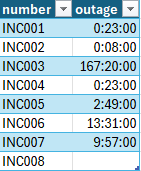
In excel, when I have a column with only time, I can not use the formulas in the article Power BI: time management because when I load it into Power BI, the data is showing with an incorrect date:
| Excel | Power BI |
 |
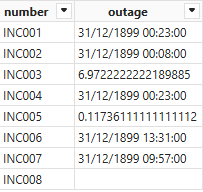 |
The “outage” column has a mix of data, values with:
- Date and time (for instance INC001)
- Decimal number (for instance INC003)
Also an outage can last more than 24 hours, for instance, 37 hours so I can not use the time format function. IMPORTANT: I make sure that my “outage” column is formatted as text in Power Query Editor (data type: text)
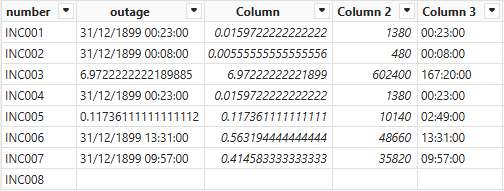
I will create a new column to convert them into decimal numbers:
var rspace = TRIM('table'[argument])
var extime = RIGHT(rspace,8)
var rhour = VALUE(LEFT(extime,2))
var rmin = VALUE(MID(extime,4,2))
var rsec = VALUE(RIGHT(extime,2))
RETURN
IF(NOT(ISBLANK(rspace)),IF(CONTAINSSTRING(rspace,"/"),DIVIDE(rhour*3600+rmin*60+rsec,86400),
VALUE(SUBSTITUTE(rspace,",","."))))

With the decimal number, I will convert them into seconds:
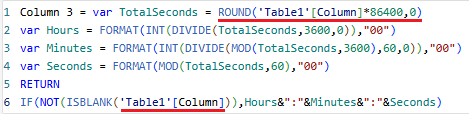
ROUND('table'[argument]*86400,0)

NOTE: for minutes, replace 86400 by 1440
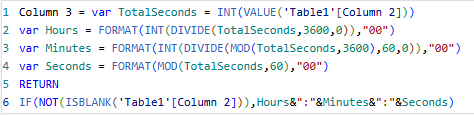
Once I have them in seconds, I will format them into hh:mm:ss:
var TotalSeconds = INT(VALUE('table'[argument]))
var Hours = FORMAT(INT(DIVIDE(TotalSeconds,3600,0)),"00")
var Minutes = FORMAT(INT(DIVIDE(MOD(TotalSeconds,3600),60,0)),"00")
var Seconds = FORMAT(MOD(TotalSeconds,60),"00")
RETURN
IF(NOT(ISBLANK('table'[argument])),Hours&":"&Minutes&":"&Seconds)
NOTE:
- If the “column 2” was in minutes, replace VALUE('table'[argument]) by VALUE('table'[argument])*60
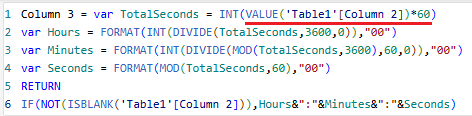
- Doing it from the decimal number, replace INT(VALUE('table'[argument])) by ROUND('table'[argument]*86400,0) and 'table'[argument]
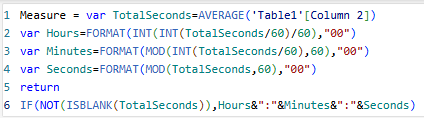
To end, I will create a measure so I can see the average duration:
var TotalSeconds=AVERAGE('table'[argument])
var Hours=FORMAT(INT(INT(TotalSeconds/60)/60),"00")
var Minutes=FORMAT(MOD(INT(TotalSeconds/60),60),"00")
var Seconds=FORMAT(MOD(TotalSeconds,60),"00")
return
IF(NOT(ISBLANK(TotalSeconds)),Hours&":"&Minutes&":"&Seconds)
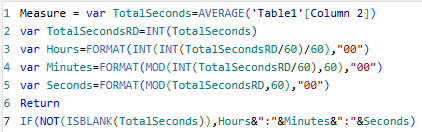
In the other hand, if I want my measure to show values rounded down, I will use this formula:
var TotalSeconds=AVERAGE('table'[argument])
var TotalSecondsRD=INT(TotalSeconds)
var Hours=FORMAT(INT(INT(TotalSecondsRD/60)/60),"00")
var Minutes=FORMAT(MOD(INT(TotalSecondsRD/60),60),"00")
var Seconds=FORMAT(MOD(TotalSecondsRD,60),"00")
Return
IF(NOT(ISBLANK(TotalSeconds)),Hours&":"&Minutes&":"&Seconds)
Interesting Topics
-

Be successfully certified ITIL 4 Managing Professional
Study, study and study, I couldn’t be successfully certified without studying it, if you are interested...
-
Be successfully certified ITIL 4 Strategic Leader
With my ITIL 4 Managing Professional certification (ITIL MP) in the pocket, it was time to go for the...
-

Hide visual and change background color based on selection
Some small tricks to customize the background colour of a text box...
-
Stacked and clustered column chart or double stacked column chart
In excel, I use a lot the combination of clustered and stacked chart...
-

Refresh Power BI
From the Power BI Service, I can set refresh but, for instance, there is no option to do it monthly or each time a change is made...
-
Power BI alerts to be sent by email from an excel file based on condition
I will explain how to send a list of emails from an excel file after creating alerts...
-

Count and check empty cells of filtered columns using a macro in an excel report
I use this macro to check if there are blank cells after I filtered...
-
Delete rows out of date using a macro in an excel report
In most of the reports, when I am doing the monthly one, I just need to keep all data that are in the month...
-
Find a specific value then insert a row and more things using a macro in an excel report
This VBA allows me to look for a specific value, it can be...
-
Execute a macro based on the day or time in an excel report
In some excel files, I am using a macro to tell it in which moment to do the report. For instance, if I am...
-
List unique values then combine in one single cell all data using a macro in an excel report
In one of my reports, I have to list from a column the unique values...
-

Copy/paste a range of values after finding the current date in an excel report
This script is to check and compare each cell of a specific column to...
-
Insert a row after finding a specific value in an excel report
This script allows to search a particular value, once find it, a new row will be inserted above or below...
-
Copy data between 2 sheets on top or bottom using an office script in an excel report
This online script allows me to copy the full data of a table to another...
-
Use a script to copy, cut, paste, replace and delete in an excel report (part 2)
This is the second part of my tutorial and it will be focused on...
-
Autofill from the last row using an office script in an excel report
This script will look for the last row then it will copy and paste the data to a number of rows below...
-

Calculate a weighted average for a SLA and a conversation time with a formula in an excel report
In one of my experiences, I had a tool that gave me the weighted average...
-
Search in different sheets then display the wanted data with a formula in an excel report
vlookup and hlookup are formulas that allow to search a data in another...
-
Find the good data by matching 3 different criterias with a formula in an excel report
It is a combination of “index” and “match” formulas, much better...
-
Sum and count sales with a formula in an excel report
Extracting data from salesforce or qlikview may not give the information I needed, it already happened...
Know how long a service is impacted with a formula in an excel report
It is important to know how long the service has been impacted by...