


Power BI: connect to the Jira Xray API test database
I will explain how to get testing tickets in Jira using the Xray cloud Rest API including test plans, test executions and test runs but if you are looking to import Jira tickets, read Power BI: connect to the Jira API v3 database.
I will explain 2 ways to do it, the option 1 is about to get few tickets (for instance, to get the last 250 tickets by using 3 times the code) but if I want to get all tickets, use the option 2. Before to start, I have to be “admin” or “owner” of the Jira project and I need to get those 3 main information:
- The project key (for instance TEST) or the project ID (for instance 11111). To know the project ID, put this in a browser: https://yourjira/rest/api/latest/project/your_project_key (for instance your_project_key = TEST so project_id = 11111)

- The client ID and the client secret, read Xray Global Settings - API Keys
The following steps are for both options.
Open Power BI and click on “home -> get data -> blank query”:

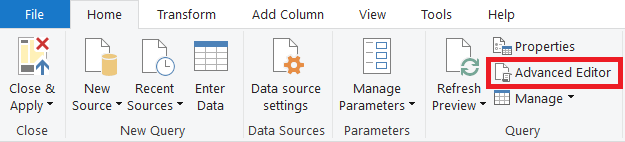
It will open Power Query Editor then click on “advanced editor”:
Delete everything:

Option 1 for small data
Put the following code and follow the instructions in the code:
let
    AuthResponse = Web.Contents("https://xray.cloud.getxray.app/", [RelativePath = "api/v2/authenticate",
        Headers = [#"Content-Type" = "application/json"],Content = Text.ToBinary
        // change your_client_id and your_client_secret by yours
        ("{""client_id"":""your_client_id"",""client_secret"":""your_client_secret""}")]),
    GetToken = Text.Replace(Text.Replace(Text.FromBinary(AuthResponse), """", ""),"Bearer ",""),
    // change your_project_key by yours and for muliple projects (jql: ""project in (your_project_key1, your_project_key2)"", start...)
    // to use project ID, replace (jql: ""project = your_project_key"", start...) by (projectId: ""your_project_id"", start...)
    // to use ticket key, replace (jql: ""project = your_project_key"", start...) by (jql: ""key = your_ticket_key"", start...)
    // to get next tickets, change start: 0 by start: 100, start: 200, etc.
    // to add more fields/columns, put inside results
    query = "{getTests (jql: ""project = your_project_key"", start: 0, limit: 100) {
        start
        limit
        total
        results {
            issueId
            projectId
            status {name}
            testType {name}
            steps {action data result}
            jira (fields: [""key"", ""created"", ""updated"", ""resolutiondate""])
            testRuns (start: 0, limit: 100) {results {
                status {name}
                finishedOn
                testExecution {jira (fields: [""key""])}
            }}
        }
    }}",
    source = Web.Contents("https://xray.cloud.getxray.app/", [RelativePath = "api/v2/graphql",
        Headers = [#"Content-Type"="application/json", #"Authorization"="Bearer " & GetToken],Content = Json.FromValue([query = query])]),
    issues = Record.ToTable(Json.Document(source)[data]){0}[Value],
    #"Converted to Table" = Table.FromList(issues[results], Splitter.SplitByNothing(), null, null, ExtraValues.Error)
in
    #"Converted to Table"

The code above is to get test tickets but to get test plan and/or test execution tickets, modify the code as in the picture:
| getTestPlans | getTestExecutions |
 |
 |
To get all tickets of sub-sections (the tests, testPlans, testExecutions and/or testRuns inside “results”) for test plans and/or test executions, there are 2 alternatives, the first one is to use multiple times the code by changing the start of the corresponding sub-section and the second one, get all with one single code without change it but the code works for a ticket and not a project and one sub-section per code for a better performance. For instance, I have a data of 294 test plan tickets and only test-11 has 134 tests and 67 test executions.
Alternative 1, get all 134 tests with multiple codes
 |
 |
Alternative 2, get all 134 tests with 1 code using ticket key (for instance TEST-1) and excluding testExecutions. To get testExecutions for test plan, follow instructions in the code.
let
    AuthResponse = Web.Contents("https://xray.cloud.getxray.app/", [RelativePath = "api/v2/authenticate",
        Headers = [#"Content-Type" = "application/json"],Content = Text.ToBinary
        // change your_client_id and your_client_secret by yours
        ("{""client_id"":""your_client_id"",""client_secret"":""your_client_secret""}")]),
    GetToken = Text.Replace(Text.Replace(Text.FromBinary(AuthResponse), """", ""),"Bearer ",""),
    // change your_project_key by yours
    // keep tests or testExecutions, not both
    GetPage = () => let Query = "query {getTestPlans (jql: ""key = your_ticket_key"", start: 0, limit: 100) {start limit total results {
        issueId projectId jira (fields: [""key"", ""created"", ""updated"", ""resolutiondate""])
        tests (start: 0, limit: 100) {total results {
            status { name }
            testType { name }
            steps { action data result }
            jira (fields: [""key""])
        }}
        testExecutions (start: 0, limit: 100) {total results {
            testEnvironments
            jira (fields: [""key""])
        }}
    }}}",
    Source = Json.Document(Web.Contents("https://xray.cloud.getxray.app/", [RelativePath = "api/v2/graphql",
        Headers = [#"Content-Type"="application/json", #"Authorization"="Bearer " & GetToken],Content = Json.FromValue([query = Query])]))
    in Source[data][getTestPlans][results],
    GetByPage = (GPSource as record, start as number) => let Query = "query {getTestPlans (jql: ""key = " & GPSource[jira][key] & """, start: 0, limit: 100) {results {
        tests (start: " & Number.ToText(start) & ", limit: 100) {results {
            status { name }
            testType { name }
            steps { action data result }
            jira (fields: [""key""])
        }}
        testExecutions (start: " & Number.ToText(start) & ", limit: 100) {results {
            testEnvironments
            jira (fields: [""key""])
        }}
    }}}",
    Source = Json.Document(Web.Contents("https://xray.cloud.getxray.app/", [RelativePath = "api/v2/graphql",
        Headers = [#"Content-Type"="application/json", #"Authorization"="Bearer " & GetToken],Content = Json.FromValue([query = Query])])),
    // if keep testExecutions, change [tests] by [testExecutions]
    Results = Source[data][getTestPlans][results]{0}[tests][results]
    in Results,
    // if keep testExecutions, change [tests] by [testExecutions]
    AllResults = List.Combine(List.Transform(GetPage(), (MainSource) => let TotalResult = MainSource[tests][total], Pages = List.Generate(() => 0, each _ < TotalResult, each _ + 100),
        AllList = List.Combine(List.Transform(Pages, (p) => GetByPage(MainSource, p))), TotalList = List.Transform(AllList, (t) => t &
        [TestPlanId = MainSource[issueId], ProjectId = MainSource[projectId], TestPlanKey = MainSource[jira][key],
            TestPlanCreated = MainSource[jira][created], TestPlanUpdated = MainSource[jira][updated], TestPlanResolved = MainSource[jira][resolutiondate]])
        in TotalList)),
    #"Converted to Table" = Table.FromList(AllResults, Splitter.SplitByNothing(), null, null, ExtraValues.Error)
in
    #"Converted to Table"

This is to get tests for test execution:

Option 2 for big data
Put the following code and follow the instructions in the code:
let
    AuthResponse = Web.Contents("https://xray.cloud.getxray.app/", [RelativePath = "api/v2/authenticate",
        Headers = [#"Content-Type" = "application/json"],Content = Text.ToBinary
        // change your_client_id and your_client_secret by yours
        ("{""client_id"":""your_client_id"",""client_secret"":""your_client_secret""}")]),
    GetToken = Text.Replace(Text.Replace(Text.FromBinary(AuthResponse), """", ""),"Bearer ",""),
    // change your_project_key by yours and for muliple projects (jql: ""project in (your_project_key1, your_project_key2)"", limit...)
    // to use project ID, replace (jql: ""project = your_project_key"", limit...) by (projectId: ""your_project_id"", limit...)
    TotalQuery = "{getTests (jql: ""project = your_project_key"", limit: 100) {total}}",
    TotalResponse = Json.Document(Web.Contents("https://xray.cloud.getxray.app/", [RelativePath = "api/v2/graphql",
        Headers = [#"Content-Type"="application/json", #"Authorization"="Bearer " & GetToken], Content = Json.FromValue([query = TotalQuery])])),
    TotalFinal = TotalResponse[data][getTests][total],
    Pages = List.Numbers(0, Number.RoundUp(TotalFinal/100), 100),
    // change your_project_key by yours and for muliple projects (jql: ""project in (your_project_key1, your_project_key2)"", start...)
    // to use project ID, replace (jql: ""project = your_project_key"", start...) by (projectId: ""your_project_id"", start...)
    // to use ticket key, replace (jql: ""project = your_project_key"", start...) by (jql: ""key = your_ticket_key"", start...)
    // to add more fields/columns, put inside results
    GetPage = (start as number) => let query = "query ($start: Int!, $limit: Int!) {
        getTests (jql: ""project = your_project_key"", start: $start, limit: $limit) {
            results {
                issueId
                projectId
		        status {name}
                testType {name}
                steps {action data result}
                jira (fields: [""key"", ""created"", ""updated"", ""resolutiondate""])
                testRuns (start: 0, limit: 100) {results {
                    status {name}
                    finishedOn
                    testExecution {jira (fields: [""key""])}
                }}
            }
        }}",
        response = Json.Document(Web.Contents("https://xray.cloud.getxray.app/", [RelativePath = "api/v2/graphql",
            Headers = [#"Content-Type"="application/json", #"Authorization"="Bearer " & GetToken],
            Content = Json.FromValue([query = query, variables = [start = start, limit = 100]])])),
        results = response[data][getTests][results]
        in results,
    AllResults = List.Combine(List.Transform(Pages, each GetPage(_))),
    #"Converted to Table" = Table.FromList(AllResults, Splitter.SplitByNothing(), null, null, ExtraValues.Error)
in
    #"Converted to Table"

The code above is to get test tickets but to get test plan and/or test execution tickets, modify the code as in the picture:
| getTestPlans | getTestExecutions |
 |
 |
To get all related tickets of sub-sections (the tests, testPlans, testExecutions and/or testRuns inside “results”) for test plans and/or test executions, there are 2 alternatives, the first one is to use multiple times the code by changing the start of the corresponding sub-section and the second one, get all with one single code without change it but one sub-section per code for a better performance. For instance, I have a data of 294 test plan tickets and only test-11 has 134 tests and 67 test executions.
Alternative 1, get all 134 tests with multiple codes
 |
 |
Alternative 2, get all 134 tests with 1 code excluding testExecutions. To get testExecutions for test plan, follow instructions in the code.
let
    AuthResponse = Web.Contents("https://xray.cloud.getxray.app/", [RelativePath = "api/v2/authenticate",
        Headers = [#"Content-Type" = "application/json"],Content = Text.ToBinary
        // change your_client_id and your_client_secret by yours
        ("{""client_id"":""your_client_id"",""client_secret"":""your_client_secret""}")]),
    GetToken = Text.Replace(Text.Replace(Text.FromBinary(AuthResponse), """", ""),"Bearer ",""),
    // change your_project_key by yours
    GetPage1 = (start as number) => let Query = "query {getTestPlans (jql: ""project = your_project_key"", start: " & Number.ToText(start) & ", limit: 100) {
        total results {issueId projectId jira (fields: [""key"", ""created"", ""updated"", ""resolutiondate""])
        }}}",
        response1 = Json.Document(Web.Contents("https://xray.cloud.getxray.app/", [RelativePath = "api/v2/graphql",
            Headers = [#"Content-Type"="application/json", #"Authorization"="Bearer " & GetToken], Content = Json.FromValue([query = Query])])),
        Total1 = response1[data][getTestPlans][total],
        Results1 = response1[data][getTestPlans][results]
        in [Total1 = Total1, Results1 = Results1],
    AllResults1 = List.Combine(List.Transform(List.Generate(() => 0, each _ < GetPage1(0)[Total1], each _ + 100), each GetPage1(_)[Results1])),
    GetPage2 = (TicketID as text, ProjectID as text, TicketKey as text, CreatedDate as text, UpdatedDate as text, ResolvedDate as nullable text) =>
        // keep tests or testExecutions, not both
        let GetPage3 = (start as number) => let Query = "query {getTestPlans (jql: ""key = " & TicketKey & """, start: 0, limit: 100)  {results {
            tests (limit: 100, start: " & Number.ToText(start) & ") {total results {
                issueId
                status {name}
                testType {name}
                steps {action data result}
                jira (fields: [""key""])
            }}
            testExecutions (limit: 100, start: " & Number.ToText(start) & ") {total results {
                testEnvironments
                jira (fields: [""key""])
            }}
        }}}",
        response2 = Json.Document(Web.Contents("https://xray.cloud.getxray.app/", [RelativePath = "api/v2/graphql",
            Headers = [#"Content-Type"="application/json", #"Authorization"="Bearer " & GetToken], Content = Json.FromValue([query = Query])])),
        // if keep testExecutions, change [tests] by [testExecutions]
        Total2 = response2[data][getTestPlans][results]{0}[tests][total],
        Results2 = try response2[data][getTestPlans][results]{0}[tests][results] otherwise {}
        in [Total2 = Total2, Results2 = Results2],
        // if keep testExecutions, change {[issueId=null, status=null, testType=null, steps=null, jira=[key=null]]} by {[testEnvironments={}, jira=[key=null]]}
        AllTickets = if GetPage3(0)[Total2] = 0 then {[issueId=null, status=null, testType=null, steps=null, jira=[key=null]]} else
            List.Combine(List.Transform(List.Generate(() => 0, each _ < GetPage3(0)[Total2], each _ + 100), each GetPage3(_)[Results2])),
        AddTicketKey = List.Transform(AllTickets, each Record.AddField(Record.AddField(Record.AddField(Record.AddField(Record.AddField(Record.AddField(_, "TestPlanId", TicketID),
            "TestPlanProject", ProjectID), "TestPlanKey", TicketKey), "TestPlanCreated", CreatedDate), "TestPlanUpdated", UpdatedDate), "TestPlanResolved", ResolvedDate))
        in AddTicketKey,
    AllResults2 = List.Combine(List.Transform(AllResults1, each GetPage2(Text.From(_[issueId]),_[projectId],_[jira][key],_[jira][created],_[jira][updated],_[jira][resolutiondate]))),
    #"Converted to Table" = Table.FromList(AllResults2, Splitter.SplitByNothing(), null, null, ExtraValues.Error)
in
    #"Converted to Table"

This is to get tests for test execution:

NOTE for both options:
- Since there is a limitation, if I load a very big single data, I will get an error of refresh in Power BI Service, I will recommend to divid the data in multiple small parts and to schedule the refresh for each part with a minimum interval of 30 minutes between them
- To avoid duplicate tickets, remove the sub-sections
Back for both options, edit my credentials (only once):


Select my data privacy (only once):


Expand the column by clicking on this icon:

Click “OK”:

About the 2 types of columns:
- List: select “expand to new rows” if I want to have each value per row or select “extract values” if I want to have all values in 1 single row

NOTE: if “extract values” gives error values, it means that there are sub-columns so to see them, select “expand to new rows”. - Record: to display sub-columns of the main column

Once published in Power BI Service, in order to configure the automatic refresh, in “data source credentials”, click on this option:

Configure like in the picture then click on “sign in”:

Interesting Topics
-

Be successfully certified ITIL 4 Managing Professional
Study, study and study, I couldn’t be successfully certified without studying it, if you are interested...
-
Be successfully certified ITIL 4 Strategic Leader
With my ITIL 4 Managing Professional certification (ITIL MP) in the pocket, it was time to go for the...
-

Hide visual and change background color based on selection
Some small tricks to customize the background colour of a text box...
-
Stacked and clustered column chart or double stacked column chart
In excel, I use a lot the combination of clustered and stacked chart...
-

Refresh Power BI
From the Power BI Service, I can set refresh but, for instance, there is no option to do it monthly or each time a change is made...
-
Power BI alerts to be sent by email from an excel file based on condition
I will explain how to send a list of emails from an excel file after creating alerts...
-

Count and check empty cells of filtered columns using a macro in an excel report
I use this macro to check if there are blank cells after I filtered...
-
Delete rows out of date using a macro in an excel report
In most of the reports, when I am doing the monthly one, I just need to keep all data that are in the month...
-
Find a specific value then insert a row and more things using a macro in an excel report
This VBA allows me to look for a specific value, it can be...
-
Execute a macro based on the day or time in an excel report
In some excel files, I am using a macro to tell it in which moment to do the report. For instance, if I am...
-
List unique values then combine in one single cell all data using a macro in an excel report
In one of my reports, I have to list from a column the unique values...
-

Copy/paste a range of values after finding the current date in an excel report
This script is to check and compare each cell of a specific column to...
-
Insert a row after finding a specific value in an excel report
This script allows to search a particular value, once find it, a new row will be inserted above or below...
-
Copy data between 2 sheets on top or bottom using an office script in an excel report
This online script allows me to copy the full data of a table to another...
-
Use a script to copy, cut, paste, replace and delete in an excel report (part 2)
This is the second part of my tutorial and it will be focused on...
-
Autofill from the last row using an office script in an excel report
This script will look for the last row then it will copy and paste the data to a number of rows below...
-

Calculate a weighted average for a SLA and a conversation time with a formula in an excel report
In one of my experiences, I had a tool that gave me the weighted average...
-
Search in different sheets then display the wanted data with a formula in an excel report
vlookup and hlookup are formulas that allow to search a data in another...
-
Find the good data by matching 3 different criterias with a formula in an excel report
It is a combination of “index” and “match” formulas, much better...
-
Sum and count sales with a formula in an excel report
Extracting data from salesforce or qlikview may not give the information I needed, it already happened...
Know how long a service is impacted with a formula in an excel report
It is important to know how long the service has been impacted by...