


Power BI: connect to the Jira eazyBI API report
Using eazyBI in Jira Cloud, I can import data from reports located in the analyze tab but not from the dashboards one:

Before to start, I will need my Jira account and token. Now, I will have to create a report and once done, click on the “3 dots -> embed report”:
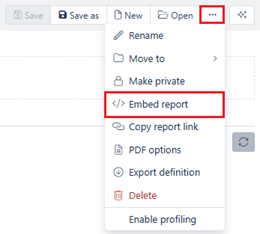
From the popup, I will need to copy the URL:
https://aod.eazybi.com/accounts/111111/embed/report/2222222
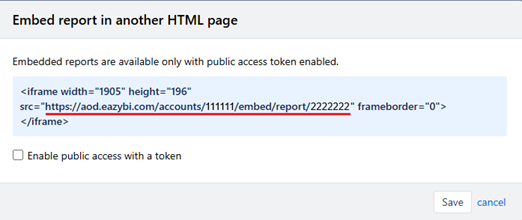
Then I will have to replace “embed” by “export” and add at the end the extension “.xls” to export it in an excel format so it will look like that:
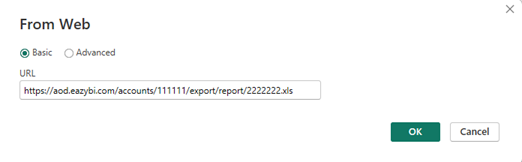
https://aod.eazybi.com/accounts/111111/export/report/2222222.xls
NOTE: do not put the “xlsx” extension since it is not supported yet at the moment I wrote this article, more information, go to its official webpage eazyBI report results export API
In Power BI Desktop, click on “get data -> web” and put the URL:
I will have to authenticate:
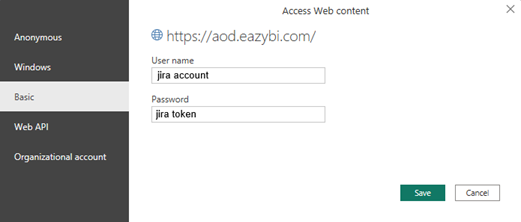
Once done, my eazyBI data will be loaded. Before to load it, I can add in the URL some conditions/filters, for more information, go to its official webpage eazyBI report results export API.
Useful eazyBI links:
I have to say that, using eazyBI, I was interested to get the Xray test plan overall execution status:
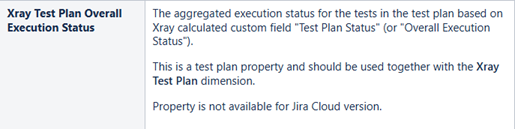
The result corresponds to the “latest status” based on the “final statuses have precedence over non-final” option:
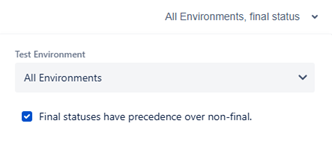
But as we can read, unfortunately this option is not available for Jira Cloud !!!
Interesting Topics
-

Be successfully certified ITIL 4 Managing Professional
Study, study and study, I couldn’t be successfully certified without studying it, if you are interested...
-
Be successfully certified ITIL 4 Strategic Leader
With my ITIL 4 Managing Professional certification (ITIL MP) in the pocket, it was time to go for the...
-

Hide visual and change background color based on selection
Some small tricks to customize the background colour of a text box...
-
Stacked and clustered column chart or double stacked column chart
In excel, I use a lot the combination of clustered and stacked chart...
-

Refresh Power BI
From the Power BI Service, I can set refresh but, for instance, there is no option to do it monthly or each time a change is made...
-
Power BI alerts to be sent by email from an excel file based on condition
I will explain how to send a list of emails from an excel file after creating alerts...
-

Count and check empty cells of filtered columns using a macro in an excel report
I use this macro to check if there are blank cells after I filtered...
-
Delete rows out of date using a macro in an excel report
In most of the reports, when I am doing the monthly one, I just need to keep all data that are in the month...
-
Find a specific value then insert a row and more things using a macro in an excel report
This VBA allows me to look for a specific value, it can be...
-
Execute a macro based on the day or time in an excel report
In some excel files, I am using a macro to tell it in which moment to do the report. For instance, if I am...
-
List unique values then combine in one single cell all data using a macro in an excel report
In one of my reports, I have to list from a column the unique values...
-

Copy/paste a range of values after finding the current date in an excel report
This script is to check and compare each cell of a specific column to...
-
Insert a row after finding a specific value in an excel report
This script allows to search a particular value, once find it, a new row will be inserted above or below...
-
Copy data between 2 sheets on top or bottom using an office script in an excel report
This online script allows me to copy the full data of a table to another...
-
Use a script to copy, cut, paste, replace and delete in an excel report (part 2)
This is the second part of my tutorial and it will be focused on...
-
Autofill from the last row using an office script in an excel report
This script will look for the last row then it will copy and paste the data to a number of rows below...
-

Calculate a weighted average for a SLA and a conversation time with a formula in an excel report
In one of my experiences, I had a tool that gave me the weighted average...
-
Search in different sheets then display the wanted data with a formula in an excel report
vlookup and hlookup are formulas that allow to search a data in another...
-
Find the good data by matching 3 different criterias with a formula in an excel report
It is a combination of “index” and “match” formulas, much better...
-
Sum and count sales with a formula in an excel report
Extracting data from salesforce or qlikview may not give the information I needed, it already happened...
Know how long a service is impacted with a formula in an excel report
It is important to know how long the service has been impacted by...