


Power BI: combine words based on criteria
This article will describe how to combine texts based on values in a calculated column but if you are more interested to do that in Power Query Editor, read Power BI: combine multiple values.
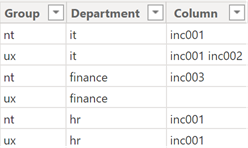
I will start with the basic, for 1 table.
Combining in horizontal (row)
- 'table1'[argument1]&" "&'table1'[argument2]&" "&'table1'[argument3]
- CONCATENATE('table1'[argument1]&" ",'table1'[argument2]&" "&'table1'[argument3])
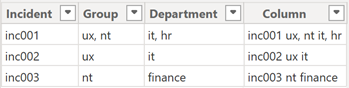
NOTE:
- Change table and argument by yours
- To separate with something else, for instance with a comma, just change " " by ","
To exclude duplicates, I will use this formula:
var extr = UNION(ROW("new value",[argument1]),ROW("new value",[argument2]),ROW("new value",[argument3]))
Return
CONCATENATEX(DISTINCT(extr),[new value]," ")

NOTE: change new value by yours
To exclude duplicates by category (for instance, for the incident column):
var vsinc = 'table1'[argument1]
Return
CONCATENATEX(DISTINCT(UNION(SELECTCOLUMNS(FILTER('table1','table1'[argument1]=vsinc ),"new value",'table1'[argument2]),SELECTCOLUMNS(FILTER('table1','table1'[argument1]=vsinc),"new value",'table1'[argument3]))),[new value]," ")

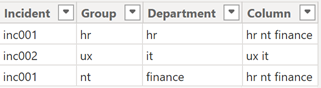
If duplicates are in a list, I will use this formula:
var extr1 = SELECTCOLUMNS(FILTER(ADDCOLUMNS(GENERATESERIES(1,PATHLENGTH(SUBSTITUTE('table1'[argument2],",",
"|"))),"new value1",TRIM(PATHITEM(SUBSTITUTE('table1'[argument2],",","|"), [value]))),[new value1]<>""),"new value2",[new value1])
var extr2 = SELECTCOLUMNS(FILTER(ADDCOLUMNS(GENERATESERIES(1,PATHLENGTH(SUBSTITUTE('table1'[argument3],",",
"|"))),"new value1",TRIM(PATHITEM(SUBSTITUTE('table1'[argument3],",","|"), [value]))),[new value1]<>""),"new value2",[new value1])
Return
'table1'[argument1]&" "&CONCATENATEX(DISTINCT(UNION(extr1,extr2)),[new value2]," ")

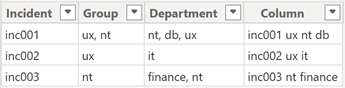
NOTE:
- Change new value1 and new value2 by yours
- If the list has different separators (for instance, a comma and a dot), add another SUBSTITUTE, for instance:
SUBSTITUTE(SUBSTITUTE('table1'[argument2],",","|"),".","|") - The “incident” column is not defined as the “group” and “department” columns because none values are in a list
If duplicates are in a list for each category:
var vsinc = 'table1'[argument1]
var extr1 = GENERATE(FILTER('table1','table1'[argument1]=vsinc),SELECTCOLUMNS(FILTER(ADDCOLUMNS(GENERATESERIES(
1,PATHLENGTH(SUBSTITUTE('table1'[argument2],",","|"))),"new value1",TRIM(PATHITEM(SUBSTITUTE('table1'[argument2],",","|"), [value]))),[new value1]<>""),"new value2",[new value1]))
var extr2 = GENERATE(FILTER('table1','table1'[argument1]=vsinc),SELECTCOLUMNS(FILTER(ADDCOLUMNS(GENERATESERIES(
1,PATHLENGTH(SUBSTITUTE('table1'[argument3],",","|"))),"new value3",TRIM(PATHITEM(SUBSTITUTE('table1'[argument3],",","|"),[value]))),[new value3]<>""),"new value4",[new value3]))
Return
CONCATENATEX(DISTINCT(UNION(SELECTCOLUMNS(extr1,"new value5",[new value2]),SELECTCOLUMNS(extr2,"new value5",[new value4]))),[new value5]," ")

Combining in vertical (column)
- CONCATENATEX('table1','table1'[argument1]," ")
- CONCATENATEX('table1','table1'[argument1]&" "&'table1'[argument2]," ")

If I have an index column for instance, I can do it for specific rows:
CONCATENATEX(FILTER('table1','table1'[Index]>=10 && 'table1'[Index]<=20),'table1'[argument1]," ")

If I have duplicate category (for instance, for the incident column), I will use this formula:
CONCATENATEX(FILTER('table1','table1'[Incident]=EARLIER('table1'[Incident])),'table1'[argument1]," ")

If I have duplicate value in a list, I will use this formula:
var extr = SELECTCOLUMNS(GENERATE('table1',ADDCOLUMNS(GENERATESERIES(1,PATHLENGTH(SUBSTITUTE('table1'
[argument2],",","|"))),"new value",TRIM(PATHITEM(SUBSTITUTE('table1'[argument2],",","|"),[value])))),"new value2",[new value])
Return
CONCATENATEX(DISTINCT(extr),[new value2]," ",[new value2])

If I have duplicate value in a list by category (for instance, for the incident column), I will use this formula:
var vsinc = 'table1'[argument1]
var comb = CONCATENATEX(FILTER('table1','table1'[argument1]=vsinc),'table1'[argument2],",")
var extr = ADDCOLUMNS(GENERATESERIES(1,PATHLENGTH(SUBSTITUTE(comb,",","|"))),"new value",TRIM(PATHITEM(SUBSTITUTE(comb,",","|"),[value])))
Return
CONCATENATEX(DISTINCT(SELECTCOLUMNS(extr,"new value2",[new value])),[new value2]," ")

If the column, that I want to combine, has empty cells, I will use this formula:
CONCATENATEX(FILTER('table1','table1'[Incident]=EARLIER('table1'[Incident]) && NOT(ISBLANK('table1'[argument1]))),'table1'[argument1]," ")

And if I want to sort it:
CONCATENATEX(FILTER('table1','table1'[Incident]=EARLIER('table1'[Incident])),'table1'[argument1]," ",'table1'[Index],ASC)

NOTE: for descending order, change ASC by DESC
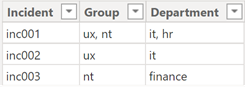
I have 2 tables:
| Table1 | Table2 |
 |
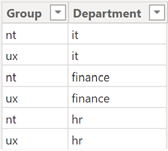 |
The goal is to combine all incidents occurred for each group in the table2. For that, I will add a new column and I will put this formula:
CONCATENATEX(FILTER('table1',CONTAINSSTRING('table1'[argument1],'table2'[argument1])),'table1'[argument3]," ")

NOTE:
- Change “table” and “argument” by yours
- Each word is separated by a space, if I want something else, I will change the end of the formula " " by "," (coma), ", " (coma space), etc.
This formula will search and find all incidents based on 1 keyword which is the group type and this is the result:
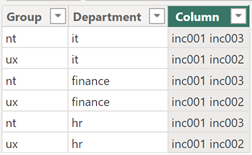
If there is no need to search for a word, it is best to use this formula:
CONCATENATEX(FILTER('table1','table1'[argument1]='table2'[argument1]),'table1'[argument3]," ")

In the other hand, if I want all incidents for a single specific group, I will replace 'table2'[argument1] by the value, for instance:
CONCATENATEX(FILTER('table1',CONTAINSSTRING('table1'[argument1],"keyword")),'table1'[argument3]," ")

Now I want the same thing but with 2 criteria, in this case, I will add another CONTAINSSTRING:
CONCATENATEX(FILTER('table1',CONTAINSSTRING('table1'[argument1],'table2'[argument1]) && CONTAINSSTRING('table1'[argument2],'table2'[argument2])),'table1'[argument3]," ")

This is the result:
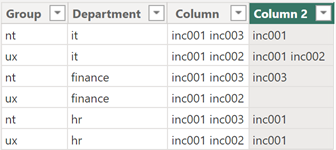
If I need more criteria, I just need to add another CONTAINSSTRING. To combine “and” (&&) and “or” (||) conditions:
CONCATENATEX(FILTER('table1',CONTAINSSTRING('table1'[argument1],'table2'[argument1]) && (CONTAINSSTRING('table1'[argument2],"value1")||CONTAINSSTRING('table1'[argument2],"value2"))),'table1'[argument3]," ")
About to get the unique value, I will include SUMMARIZE in the formula:
- For 1 keyword: CONCATENATEX(FILTER(SUMMARIZE('table1','table1'[argument3],'table1'[argument1]),CONTAINSSTRING(
'table1'[argument1],'table2'[argument1])),'table1'[argument3]," ")

- For 2 and more: CONCATENATEX(FILTER(SUMMARIZE('table1','table1'[argument3],'table1'[argument1],'table1'[argument2]),
CONTAINSSTRING('table1'[argument1],'table2'[argument1]) && CONTAINSSTRING('table1'[argument2],'table2'[argument2])),'table1'[argument3]," ")

NOTE: to combine values without any conditions, read Power BI: match values between 2 columns then concatenate
Interesting Topics
-

Be successfully certified ITIL 4 Managing Professional
Study, study and study, I couldn’t be successfully certified without studying it, if you are interested...
-
Be successfully certified ITIL 4 Strategic Leader
With my ITIL 4 Managing Professional certification (ITIL MP) in the pocket, it was time to go for the...
-

Hide visual and change background color based on selection
Some small tricks to customize the background colour of a text box...
-
Stacked and clustered column chart or double stacked column chart
In excel, I use a lot the combination of clustered and stacked chart...
-

Refresh Power BI
From the Power BI Service, I can set refresh but, for instance, there is no option to do it monthly or each time a change is made...
-
Power BI alerts to be sent by email from an excel file based on condition
I will explain how to send a list of emails from an excel file after creating alerts...
-

Count and check empty cells of filtered columns using a macro in an excel report
I use this macro to check if there are blank cells after I filtered...
-
Delete rows out of date using a macro in an excel report
In most of the reports, when I am doing the monthly one, I just need to keep all data that are in the month...
-
Find a specific value then insert a row and more things using a macro in an excel report
This VBA allows me to look for a specific value, it can be...
-
Execute a macro based on the day or time in an excel report
In some excel files, I am using a macro to tell it in which moment to do the report. For instance, if I am...
-
List unique values then combine in one single cell all data using a macro in an excel report
In one of my reports, I have to list from a column the unique values...
-

Copy/paste a range of values after finding the current date in an excel report
This script is to check and compare each cell of a specific column to...
-
Insert a row after finding a specific value in an excel report
This script allows to search a particular value, once find it, a new row will be inserted above or below...
-
Copy data between 2 sheets on top or bottom using an office script in an excel report
This online script allows me to copy the full data of a table to another...
-
Use a script to copy, cut, paste, replace and delete in an excel report (part 2)
This is the second part of my tutorial and it will be focused on...
-
Autofill from the last row using an office script in an excel report
This script will look for the last row then it will copy and paste the data to a number of rows below...
-

Calculate a weighted average for a SLA and a conversation time with a formula in an excel report
In one of my experiences, I had a tool that gave me the weighted average...
-
Search in different sheets then display the wanted data with a formula in an excel report
vlookup and hlookup are formulas that allow to search a data in another...
-
Find the good data by matching 3 different criterias with a formula in an excel report
It is a combination of “index” and “match” formulas, much better...
-
Sum and count sales with a formula in an excel report
Extracting data from salesforce or qlikview may not give the information I needed, it already happened...
Know how long a service is impacted with a formula in an excel report
It is important to know how long the service has been impacted by...